
OSI Model Explained (7 Layers with Real-Life Examples – CCNA Day 2)

Introduction
To understand networking deeply, you must learn the OSI Model.
The OSI Model (Open Systems Interconnection Model) explains how data travels from one device to another.
In this guide, you will learn:
What is OSI Model
All 7 layers explained
Real-life example
Easy memory tricks
What is OSI Model?
The OSI Model is a 7-layer framework used to understand network communication.
Each layer has a specific function in sending and receiving data.
👉 Think of it like a step-by-step process for data transfer.
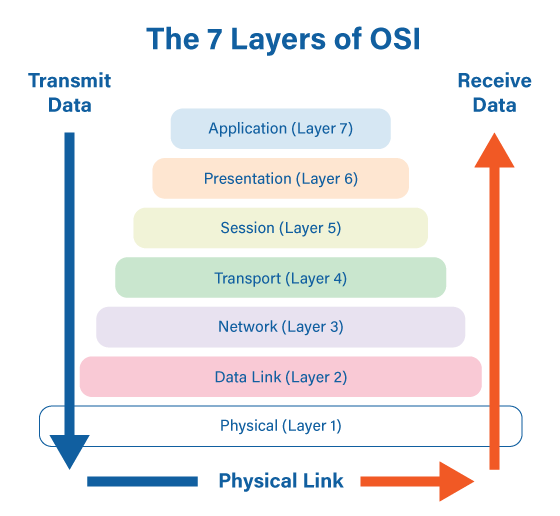
7 Layers of OSI Model
From top to bottom:
Application
Presentation
Session
Transport
Network
Data Link
Physical
Easy Memory Trick
👉 "All People Seem To Need Data Processing"
A → Application
P → Presentation
S → Session
T → Transport
N → Network
D → Data Link
P → Physical
Layer-by-Layer Explanation
7️⃣ Application Layer
Closest to user
Provides network services
Examples:
Web browser
Email
6️⃣ Presentation Layer
Data formatting
Encryption / Decryption
Example:
Converting data into readable format
5️⃣ Session Layer
Manages connection between devices
Starts and ends session
4️⃣ Transport Layer
Ensures reliable data delivery
Error checking
Protocols:
TCP (reliable)
UDP (fast)
3️⃣ Network Layer
Handles IP addressing
Routing data
Example:
Router works here
2️⃣ Data Link Layer
MAC address
Frame transmission
Example:
Switch works here
1️⃣ Physical Layer
Actual transmission of data
Cables, signals
Example:
Fiber cable, Ethernet
Real-Life Example (Simple)
Sending WhatsApp message:
Application → You type message
Presentation → Message encrypted
Session → Connection established
Transport → Message divided into packets
Network → IP address used
Data Link → MAC address used
Physical → Data sent via cable/WiFi
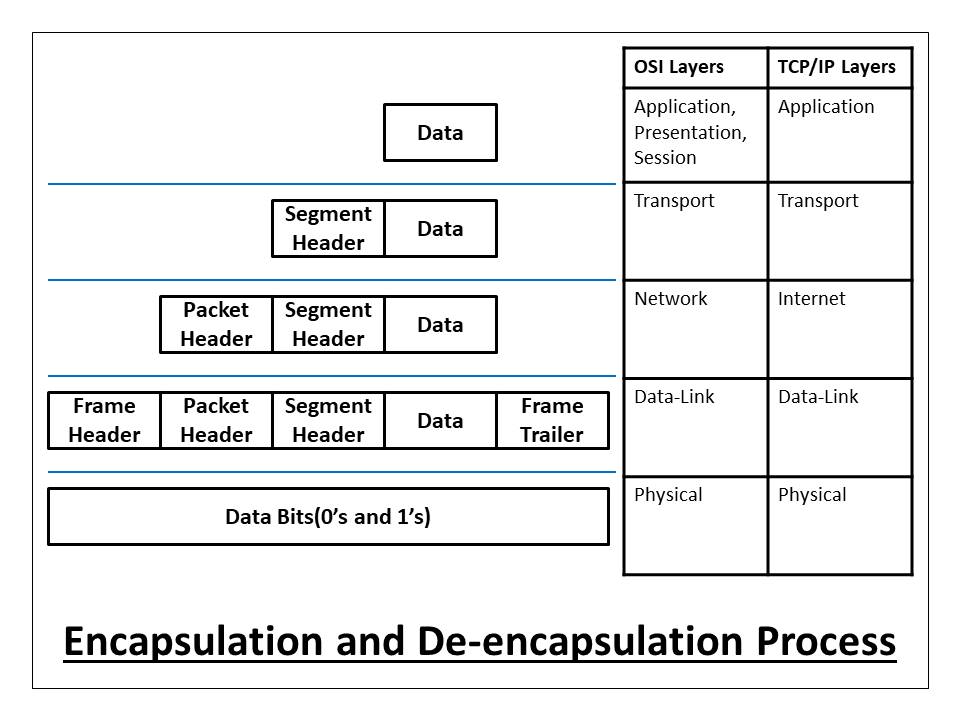
Data Encapsulation Process
When data is sent:
Each layer adds its own header
When data is received:
Each layer removes header
This process is called encapsulation.
Why OSI Model is Important
It helps in:
✔ Understanding network flow
✔ Troubleshooting issues
✔ Designing networks
✔ Learning CCNA concepts
OSI vs Real Devices
| Device | Layer |
|---|---|
| Router | Network |
| Switch | Data Link |
| Hub | Physical |
Common Interview Question
👉 “Which layer does router work on?”
Answer: Network Layer (Layer 3)
Conclusion
The OSI Model is the foundation of networking.
By understanding all 7 layers, you can:
✔ Understand how data travels
✔ Troubleshoot network issues
✔ Build strong networking knowledge
This is one of the most important topics in CCNA.
SEO Keywords
OSI model explained
7 layers of OSI model
network layers CCNA
OSI model real life example
data encapsulation networking
CCNA basics OSI
Suggested Blogger Tags
CCNA
OSI Model
Networking Basics
Network Layers
Cisco
IT Networking
Routing Switching

0 Response to "OSI Model Explained (7 Layers with Real-Life Examples – CCNA Day 2)"
Post a Comment