
Optical Power Level in FTTH Explained (Complete Practical Guide 2026)



Introduction
In FTTH networks, one of the most important technical parameters is Optical Power Level.
If power is not within proper range:
Internet becomes unstable
Speed fluctuates
LOS may appear
Frequent disconnections happen
As an FTTH engineer, understanding optical power is essential for proper troubleshooting.
In this guide, you will learn:
What is optical power?
What is dBm?
Normal power range in GPON
Causes of low power
Field troubleshooting steps
Link budget basics
What is Optical Power?
Optical power is the strength of light signal received by ONT from OLT.
Since FTTH works on Gigabit Passive Optical Network (GPON) technology, data is transmitted using light through fiber cable.
This light strength is measured in:
dBm (decibel-milliwatts)
What is dBm?
dBm is a unit used to measure signal power.
In fiber networks, values are negative because signal loses strength over distance.
Example:
-8 dBm → Very strong signal
-15 dBm → Good signal
-25 dBm → Weak but working
-30 dBm → Very weak (unstable)
More negative value = weaker signal.
Normal Optical Power Range in GPON
For most FTTH networks:
| Condition | Power Level |
|---|---|
| Excellent | -8 dBm to -15 dBm |
| Good | -15 dBm to -25 dBm |
| Acceptable | -25 dBm to -27 dBm |
| Critical | Below -28 dBm |
If power goes below -28 dBm → internet may disconnect frequently.
Where to Check Optical Power?
You can check power level in:
1️⃣ ONT Web Login Page
2️⃣ OLT Monitoring Panel
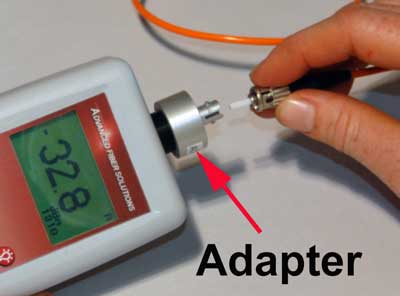
3️⃣ Optical Power Meter
Example ONT login:
192.168.1.1
Check → Status → PON Information
Why Optical Power Becomes Low?
There are multiple reasons:
1️⃣ Long Distance
Maximum GPON distance is around 20 km.
More distance = more loss.
2️⃣ High Splitter Ratio
Example:
1:8 → Low loss
1:16 → Medium loss
1:32 → Higher loss
1:64 → Very high loss
Higher split = more signal reduction.
3️⃣ Poor Splicing
Bad fusion splice increases attenuation.
4️⃣ Dirty Connector
Dust on fiber connector can reduce power by 2–3 dB easily.
Always clean connectors before testing.
5️⃣ Fiber Bending (Macro Bending)
Sharp bending reduces signal strength.
Minimum bending radius must be maintained.
What is Link Budget?
Link budget is total signal loss from OLT to ONT.
It includes:
Fiber loss (0.35 dB per km approx.)
Splitter loss
Splice loss
Connector loss
If total loss exceeds GPON limit (~28 dB), connection becomes unstable.
Practical Field Troubleshooting
If customer complains slow internet:
Step 1:
Check ONT power level.
Step 2:
If below -27 dBm:
Inspect patch cord
Check FAT port
Measure power at splitter
Step 3:
If multiple users low power:
Feeder issue
Splitter overload
Splice problem
Example Field Scenario
Customer power reading:
-29.5 dBm
Symptoms:
Frequent disconnection
Speed drop
Buffering
Solution:
Replace patch cord
Clean connectors
Power improved to -22 dBm
Problem solved
Why Optical Power is Important?
Because fiber network performance depends entirely on signal quality.
Correct power level ensures:
Stable internet
Better speed
Low latency
Fewer complaints
As an FTTH engineer, always check power before replacing ONT.
Conclusion
Optical power level is the backbone of FTTH troubleshooting.
Understanding:
dBm values
Acceptable range
Link budget
Splitter impact
helps you solve fiber issues professionally.
Never ignore power reading — it tells the real story of the network.
SEO Keywords
Optical power in FTTH
dBm meaning in fiber
GPON power level range
Low optical power solution
Fiber link budget explained
FTTH troubleshooting guide

0 Response to "Optical Power Level in FTTH Explained (Complete Practical Guide 2026)"
Post a Comment